Graph-Me-Maybe reads the spreadsheets, slide decks, contracts and PDFs scattered across your drives the way a person would, and answers with the exact cell, slide or paragraph. Open source. Runs on your computer.
Clean text is easy. The documents a company actually runs on are not clean:
Pull out the text and chunk it, and all of that structure is gone. Graph-Me-Maybe reads each page the way you see it, and keeps how the documents connect.
The document: a Word memo whose warehouse floor plan was inserted as a picture.
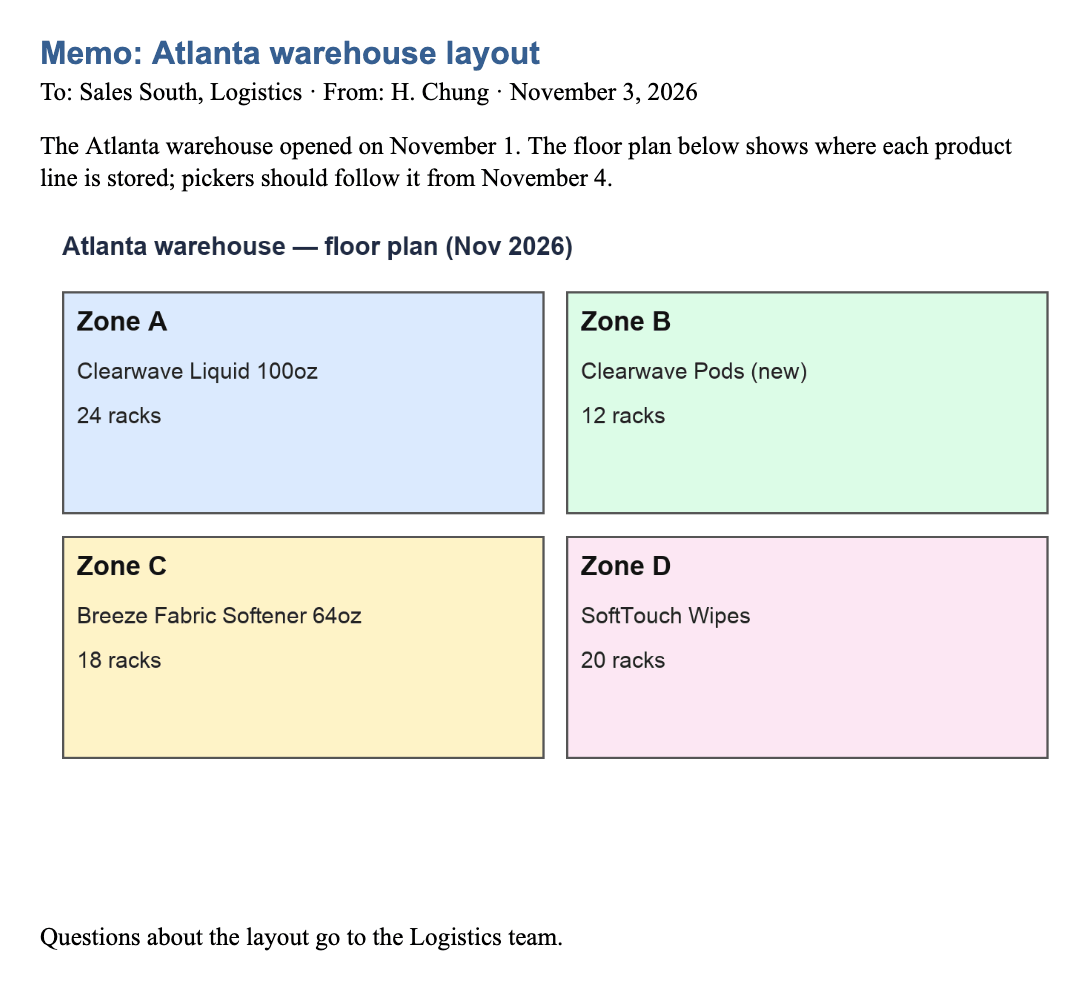
I couldn’t find this in the provided context. The memo says the floor plan shows where each product line is stored, but the floor plan is an embedded image that didn’t come through as readable content.
The data doesn’t say where Breeze Fabric Softener 64oz is stored in the Atlanta warehouse or how many racks it occupies.
Breeze Fabric Softener 64oz is stored in Zone C of the Atlanta warehouse, on 18 racks. [Memo_Atlanta_Warehouse_Layout.docx]
Answers shortened; all three systems used the same model (Claude Haiku 5.5). Pilot on 35 invented documents — the full benchmark is under way.
To build its graph, classic GraphRAG asks a model about every chunk of text, then again to summarize what it found. That takes time and model calls on every document, and the graph it keeps can outgrow the documents themselves.
Graph-Me-Maybe reads each page as a page and lets the file’s own structure — sheets, slides, headings, cells — do the rest. Documents are linked by what they cite and resemble, not by a model call for every pair.
Measured against Microsoft GraphRAG and LightRAG on the same documents:
Four steps, all on your computer.
Each file is drawn the way you would see it, and every cell, shape and line of text is located on the page.
A vision model reads the outline: what is a heading, what sits under it, which note belongs to which table.
Pages become a knowledge graph. A report that cites a spreadsheet is linked to it; similar documents to each other.
Hybrid search finds the evidence and follows the links; the answer cites the exact place.
Sales figures in Box, the board deck in Google Drive, contracts in SharePoint. Connect them through the desktop apps you already use, add local folders, and ask once.
Trace a figure back to the sheet and the slide that explain it.
Which region grew the most in Q3, and why?Which quarter of 2026 had the highest operating income so far?How much is budgeted for the Atlanta warehouse lease in Q4?Find the review deck, the meeting decision and the plan that followed.
Why did Southeast sales drop, and what is the Q4 plan?Which account ended its agreement in August, and what did it cost per month?What was e-commerce sales attainment in October?Get the clause itself, not a summary of it.
When can we terminate the Tampa Bay distribution agreement?What territory does the Milwaukee distributor cover?What are the storage and picking fees in the 3PL agreement?Follow a complaint log to the report and the revised spec.
Which product had the most quality complaints in Q3, and what was done?How did the Breeze 64oz specification change during 2026?Which product has sat in inventory the longest, and what are we doing about it?The app installs its own graph database and search model. When a page is read or an answer is written, that page’s image and text go to the model provider you choose — nothing else leaves.
Read the data flowFor reading pages and writing answers, yes — OpenAI, Anthropic or Gemini, your choice. Search itself runs locally without one.
It works across the thousands of files in your drives, remembers how they relate in a graph, and shows the exact cell, slide or paragraph behind each answer.
Yes. Pages are rendered and read as a person sees them, so a value in a chart, a cell in a table or a label in a diagram can be found and cited.
Yes — documents and questions in Korean and English are both supported.
Yes. It is open source under the MIT license. You pay only your model provider.
Open source, free. One command installs it and opens it with sample documents.